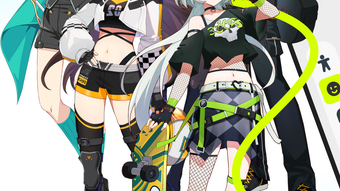

ZRolee: Virtual Social Networking with 3D Voice Rooms
Overview
ZRolee delivers a distinctive virtual social networking experience centered around character customization and real-time voice interaction. Designed for users seeking deeper, more expressive connections online, the app enables individuals to craft personalized avatars and explore a dynamic digital world where socializing feels immersive. Through advanced 3D technology, ZRolee facilitates voice group chat rooms, creating an environment that simulates face-to-face conversations. This setup allows users to form friendships and engage in meaningful discussions based on shared interests, regardless of geographic location.
The platform appeals to a broad audience, including teens, young adults, and creative individuals who value self-expression and community building. Whether users are interested in fashion, gaming, or simply meeting new people, ZRolee provides a space to interact through voice and visual identity. The app’s focus on virtual dressing and expressive avatars supports personal branding and identity exploration, making it ideal for those who enjoy creative self-presentation in digital environments.
While the developer did not provide additional details about the company background, the app’s release on both Windows and Mac platforms suggests a cross-platform strategy aimed at accessibility. Real-world use cases include online social clubs, interest-based discussion groups, and casual hangouts where users can connect through shared hobbies or creative expression. The app’s structure emphasizes interaction over passive scrolling, encouraging active participation in a vibrant, evolving community.
Key Features & Capabilities
- Character Customization – Users can personalize their avatars with a variety of clothing, accessories, and styles, allowing for unique visual identities that reflect personal taste and creativity.
- 3D Voice Group Chat Rooms – Advanced spatial audio technology creates a realistic, immersive atmosphere where users can engage in conversations with others in real time, enhancing the sense of presence and connection.
- Global Community Interaction – The app connects users from around the world, enabling spontaneous conversations and the formation of lasting friendships based on shared interests.
- VIP Benefits – Premium users gain access to exclusive features such as unique photo poses, special badges, enhanced customization tools, and discounts on outfit purchases.
- Real-Time Social Engagement – Users can freely chat, express themselves, and participate in dynamic social environments without restrictions on topic or duration.
These features support a range of social activities, from casual hangouts to structured interest-based gatherings. For example, a user passionate about anime might join a themed voice room to discuss series, share fan art, and customize their avatar with related outfits. Similarly, someone exploring their identity might use the app to experiment with different styles and receive feedback from peers in a safe, supportive environment. The integration of 3D audio helps users distinguish between speakers, improving clarity and reducing cognitive load during group interactions.
User Interface, Workflow & Performance
The user interface of ZRolee appears designed with simplicity and immersion in mind, focusing on intuitive navigation and visual engagement. Users can access their profile, avatar customization tools, and voice chat rooms through a streamlined dashboard. The layout prioritizes accessibility, allowing quick transitions between different sections without unnecessary steps.
Workflow efficiency is supported by direct access to group chat rooms, where users can join or create spaces based on interest, language, or activity. The app’s design encourages immediate participation, minimizing onboarding friction. However, exact performance details were not specified by the developer, including CPU or RAM usage patterns.
General observations suggest that the app operates smoothly within standard desktop environments, though actual behavior may vary based on system configuration. Stability during extended sessions and response times in high-traffic rooms remain unverified. The developer did not specify resource usage details, so users should monitor performance during use. No known compatibility issues were reported at launch, but real-world testing across diverse hardware setups is recommended for optimal experience.
Compatibility & System Requirements
ZRolee is available for both Windows and Mac operating systems, supporting a wide range of desktop users. The software has a file size of 100MB, indicating a lightweight installation that should not place significant strain on storage. The app’s version is 1.0.0, marking its initial public release.
Exact system requirements were not listed by the developer. This includes details about minimum CPU, RAM, graphics capabilities, or audio hardware needs. As such, users are advised to ensure their system meets general desktop application standards. The developer did not specify whether additional drivers or runtime environments are required for operation.
Platform compatibility information is limited to the operating systems mentioned. No support for mobile devices or web-based access was indicated. Users should verify that their system is up to date and capable of running modern graphical applications before installation.
Pros and Cons
Pros
- Immersive 3D voice chat experience enhances real-time social interaction
- Extensive character customization supports creative self-expression
- Available for both Windows and Mac platforms
- Free to download and use with optional VIP upgrades
- Global community fosters connections across cultures and time zones
Cons
- System requirements were not publicly disclosed
- No information on long-term stability or performance under heavy load
- Privacy and data handling policies were not provided
- App lacks visible offline functionality
- Limited details on moderation or safety features
FAQ Section
Is ZRolee available for both Windows and Mac?
Yes, ZRolee is compatible with both Windows and Mac operating systems, allowing users on either platform to access the app.
Is the software free to use?
Yes, ZRolee is available at no cost. Users can download and use the app without payment, though premium features may require a subscription.
Does ZRolee require an internet connection?
Yes, the app relies on a stable internet connection to access voice chat rooms and maintain real-time interactions with other users.
Can I use ZRolee offline?
There is no indication that ZRolee supports offline functionality. All core features require an active internet connection.
How often does ZRolee release updates?
The update frequency has not been specified by the developer. Users should check the official website or app for the latest version and release notes.
Final Thoughts
ZRolee presents a compelling alternative to traditional social platforms by combining character customization with immersive 3D voice interaction. Its focus on meaningful connections through expressive avatars and real-time audio makes it well-suited for users who value creativity and authentic social experiences. While some technical and policy details remain unclear, the app’s lightweight design and cross-platform availability enhance accessibility.
For individuals seeking a dynamic, visually engaging space to meet new friends and express themselves, ZRolee offers a fresh approach to digital socializing. The combination of 3D voice rooms and personal styling tools creates a unique environment that stands out in the crowded social networking landscape. Despite missing documentation on system demands and safety practices, the app’s initial offering is promising.
Download ZRolee now







